
STalign and STcompare to identify spatially sexually dimorphic genes in single-cell resolution spatial transcriptomics data of mouse kidneys
Introduction
Thanks to the amazing Kamil Slowikowski, we have been able to port over elements of the implementation of our bioinformatics tools STalign and STcompare from native Python and R, respectively, to C++. This allows us to now run pair-wise spatial structural alignment and identify spatially differentially patterned genes between spatial transcriptomics datasets in a matter of seconds as opposed to hours. So in this blog post, I put these new implementations to the test!
In a previous blog post, I tried to identify spatially sexually dimorphic genes in Visium spatial transcriptomics data of female and male mouse kidneys by very approximately manually affine aligning and then using STcompare. This arguably poor alignment and lack of single-cell resolution may have limited discoveries.
So in this tutorial, I will try again to identify spatially sexually dimorphic genes now using molecular-resolution resolution, targeted spatial transcriptomics data of a female and male mouse kidney assayed via Cartana courtesy of Wu et al, using a non-linear diffeomorphic alignment with STalign and then using STcompare.
Downloading the data
Data for the male kidney tissue section is beautifully organized and accessible through GEO under GSM7090410 and the female under GSM7090415.
I decided to use the Baysor output available in the GSM7090410_cartana_sham_male_segmentation.tar.gz and GSM7090415_cartana_sham_female_segmentation.tar.gz files respectively. segmentation_cell_stats.csv contains cell information, including the centroid in the x and y columns. segmentation_counts.tsv contains the gene expression counts per cell.
Feel free to download the same files and follow along. I like to organize these files in a data/ folder in my working directory.
Using STalign to structurally align the two kidneys
In order to make spatial gene expression comparisons between the male and female kidneys, we must first perform a structural alignment to help ensure the differences we see are not being confounded by structural differences. We will use STalign to perform a non-linear diffeomorphic alignment.
Note the following code is in Python.
## import dependencies
import numpy as np
import matplotlib.pyplot as plt
import pandas as pd
import STalign

# make plots bigger
plt.rcParams["figure.figsize"] = (12,10)
STalign takes as input the cell centroids as numpy arrays. Its default parameters assume that centroid positions are provided in units of microns. If you have pixels or another unit, you can either change the default parameters accordingly else convert to microns. Personally, I find converting to micron units more interpretable, as we will see later.
# micrometers per image pixel (assumed)
um_per_px = 0.1625

# source (male) and target (female) cells
df1 = pd.read_csv('data/GSM7090410_cartana_sham_male/segmentation_cell_stats.csv.gz')
df2 = pd.read_csv('data/GSM7090415_cartana_sham_female/segmentation_cell_stats.csv.gz')
print(df1.head())

# cell centroids in um
xI = df1['x'].to_numpy()*um_per_px
yI = df1['y'].to_numpy()*um_per_px
xJ = df2['x'].to_numpy()*um_per_px
yJ = df2['y'].to_numpy()*um_per_px
   cell            x            y  cluster  n_transcripts   density  \
0     1  5905.766000  4884.044000        4              5  0.007945
1     2  5086.160000  5708.391250        5              8  0.011020
2     3  5556.215000  5281.355000        6             10  0.005935
3     4  5017.552000  5799.638000        5             10  0.010640
4     5  6035.902857  4798.607143        5              7  0.007109

   elongation    area  avg_confidence
0       5.859   629.3          0.9994
1       1.989   725.7          0.9999
2       2.592  1685.0          1.0000
3       3.218   940.2          1.0000
4       4.155   984.7          0.9992
We can first visualize the two datasets to get a better sense of where we’re starting from. STalign requires you pick one dataset as the source and one as the target. I picked the male kidney section as the source and the female as the target. So the goal will be to learn a diffeomorphic transformation that can be applied onto the male kidney section to make it look more like the female.
# move the centroid of the source cells onto the centroid of the target cells
xI = xI - xI.mean() + xJ.mean()
yI = yI - yI.mean() + yJ.mean()

fig,ax = plt.subplots()
ax.scatter(xI,yI,s=0.5,alpha=0.1, label='source (male)')
ax.scatter(xJ,yJ,s=0.5,alpha=0.1, label='target (female)')
ax.set_aspect('equal')
ax.invert_yaxis()
ax.legend(markerscale = 20, loc = 'lower left')
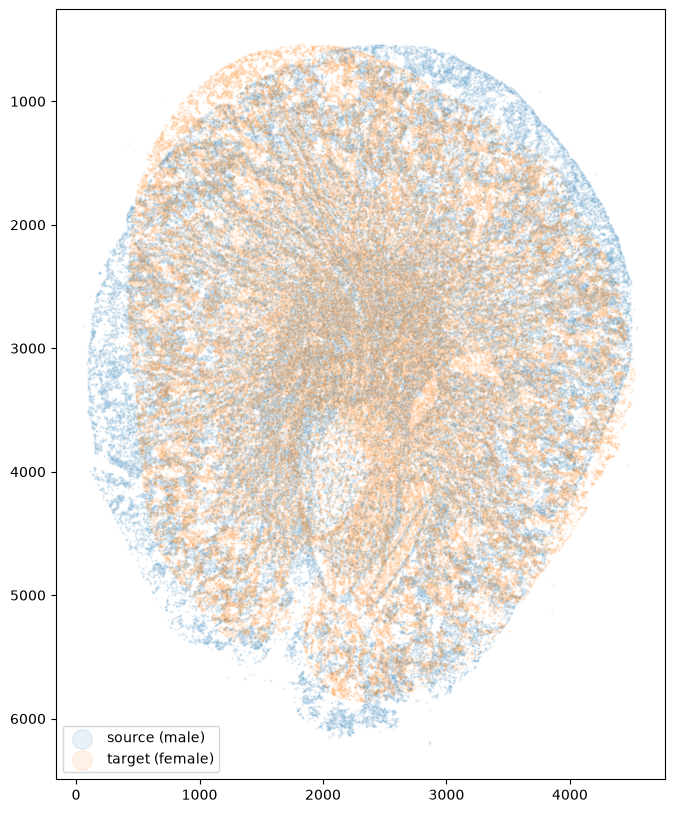
Now we can use the align_cells function to rasterize both sets of cells into density images and runs LDDMM on them. Note there are many parameters here that assume units of microns. For example, dx=30 rasterize the cells at 30 µm resolution. So if your input units are not in microns, this parameter, among others, will need to be scaled accordinly.
%%time
out = STalign.align_cells(xI, yI, xJ, yJ, dx=30, levels=((2,1000),(1,3000)),
                          mixture=None, prefit=False, device='cpu')
CPU times: user 15.7 s, sys: 229 ms, total: 15.9 s
Wall time: 2.73 s
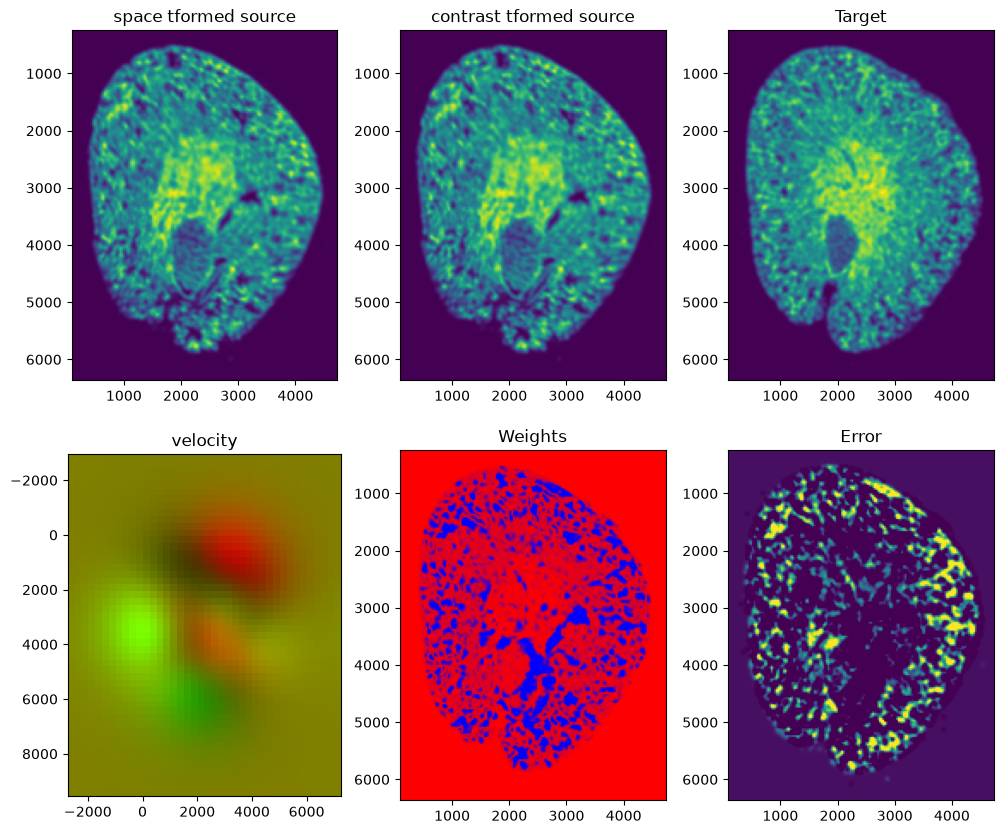
Now we can apply the learned transform to the source cells and visualize the resulting aligned coordinates.
tpointsI = STalign.transform_points_source_to_target(out['xv'], out['v'], out['A'], np.stack([yI, xI], 1)).cpu().numpy()
xI_aligned = tpointsI[:,1]
yI_aligned = tpointsI[:,0]

fig,ax = plt.subplots()
ax.scatter(xI_aligned,yI_aligned,s=0.5,alpha=0.1, label='source (male), STaligned')
ax.scatter(xJ,yJ,s=0.5,alpha=0.1, label='target (female)')
ax.set_aspect('equal')
ax.invert_yaxis()
ax.legend(markerscale = 20, loc = 'lower left')
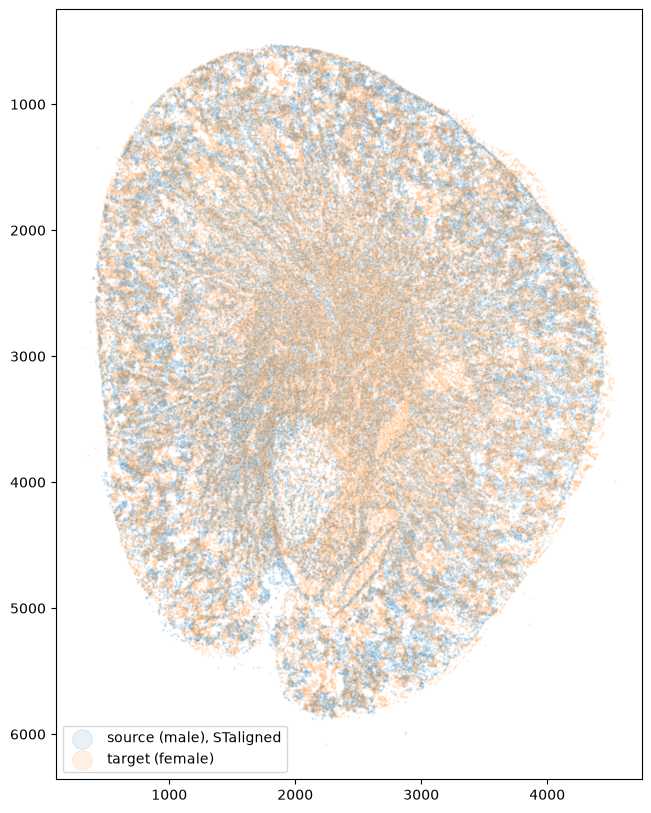
Indeed, we can visually confirm that the two kidney slices are much better structurally aligned now. So we can write out these results to more readily read them into R for analysis with STcompare.
results = df1.assign(aligned_x = xI_aligned/um_per_px,
                     aligned_y = yI_aligned/um_per_px,
                     aligned_x_um = xI_aligned,
                     aligned_y_um = yI_aligned)
results.to_csv('data/GSM7090410_cartana_sham_male/STalign_to_GSM7090415_cartana_sham_female_align_cells.csv.gz', compression='gzip', index=False)
Using STcompare to compare spatial gene expression patterns
Given these structurally aligned tissue sections, we can now use STcompare to identify genes with significantly significant differential spatial patterns while taking into consideration auto-correlation present in this data, which may inflate p-values.
Note the following code is in R.
library(STcompare)
library(SpatialExperiment)
library(SEraster)
library(ggplot2)
library(patchwork)

threads <- min(8L, max(1L, parallel::detectCores() - 1L, na.rm = TRUE))
Next, we read our new STaligned cell positions for the male kidney data into R. Note the cell positions for the female kidney data is the same as before.
male <- read.csv("data/GSM7090410_cartana_sham_male/STalign_to_GSM7090415_cartana_sham_female_align_cells.csv.gz")
female <- read.csv("data/GSM7090415_cartana_sham_female/segmentation_cell_stats.csv.gz")
head(male[, c("cell", "x", "y", "aligned_x", "aligned_y")], 3)
head(female[, c("cell", "x", "y")], 3)
  cell        x        y aligned_x aligned_y
1    1 5905.766 4884.044  5215.722  6257.966
2    2 5086.160 5708.391  4565.575  7172.919
3    3 5556.215 5281.355  4937.389  6690.009

  cell        x        y
1    1 5615.945 5866.002
2    2 5672.678 5792.908
3    3 5315.306 6175.102
Then we read in the corresponding gene count information, again stored in segmentation_counts.tsv. Here the genes are rows and the cells are columns, and the first column holds the gene names.
maleCounts <- as.matrix(read.delim("data/GSM7090410_cartana_sham_male_segmentation/segmentation_counts.tsv",
                                   row.names = 1, check.names = FALSE))
femaleCounts <- as.matrix(read.delim("data/GSM7090415_cartana_sham_female_segmentation/segmentation_counts.tsv",
                                     row.names = 1, check.names = FALSE))
dim(maleCounts)
dim(femaleCounts)
maleCounts[1:5, 1:5]
[1]   193 85445
[1]   194 94869

      1 2 3 4 5
A2m   0 0 0 0 0
Ackr1 0 0 0 0 0
Acta2 0 0 0 0 0
Ager  0 0 0 0 0
Aire  0 0 0 0 0
Cartana is a targeted technology, so we only have about 200 genes. We will see how this presents limitations later. Just as a precaution, we need the counts and the positions to describe the same cells in the same order, so we reorder the count columns by the cell column of the position tables and further limit comparisons to genes measured in both kidneys.
maleCounts <- maleCounts[, as.character(male$cell)]
femaleCounts <- femaleCounts[, as.character(female$cell)]

genes <- intersect(rownames(maleCounts), rownames(femaleCounts))
Even after alignment, each male cell has no exact counterpart at the same position in the female kidney. As in the previous tutorial, we create a common spatial unit of comparison by rasterizing both kidneys onto one shared grid of hexagonal pixels with SEraster. First, we put each kidney into a SpatialExperiment object. Cell IDs restart at 1 in each dataset, so we prefix them with the sex to keep them unique. Again, we convert units to microns so we can interpret the rasterization resolution accordingly.
umPerPx <- 0.1625
maleXY <- cbind(x = male$aligned_x, y = -male$aligned_y) * umPerPx
femaleXY <- cbind(x = female$x, y = -female$y) * umPerPx
rownames(maleXY) <- colnames(maleCounts) <- paste0("male_", male$cell)
rownames(femaleXY) <- colnames(femaleCounts) <- paste0("female_", female$cell)

maleSpe <- SpatialExperiment(assays = list(counts = Matrix::Matrix(maleCounts[genes, ], sparse = TRUE)),
                             spatialCoords = maleXY)
femaleSpe <- SpatialExperiment(assays = list(counts = Matrix::Matrix(femaleCounts[genes, ], sparse = TRUE)),
                               spatialCoords = femaleXY)

resolution <- 200 # um
rast <- SEraster::rasterizeGeneExpression(list(female = femaleSpe, male = maleSpe),
                                          assay_name = "counts", resolution = resolution,
                                          fun = "sum", square = FALSE)
We can drop pixels with fewer than 10 cells, then normalize each pixel to counts per million (CPM), so that pixels with more cells or more transcripts are comparable. Finally, we find the pixels present in both kidneys, which are the ones STcompare will compare.
cpm <- function(m) Matrix::t(Matrix::t(m) / Matrix::colSums(m)) * 1e6
for (s in names(rast)) {
  rast[[s]] <- rast[[s]][, rast[[s]]$num_cell >= 10]
  assay(rast[[s]], "CPM") <- cpm(assay(rast[[s]], "pixelval"))
}
shared <- intersect(colnames(rast$female), colnames(rast$male))
length(shared)
[1] 505
Let’s check that rasterization keeps the anatomy with Epcam (epithelial cell adhesion molecule), which marks epithelial cells of the distal nephron and collecting ducts and should have a clear spatial pattern in these kidneys.
g <- "Epcam"
SEraster::plotRaster(rast$female, assay_name = "CPM", feature_name = g, plotTitle = paste(g, "female"), name = "CPM") +
  SEraster::plotRaster(rast$male, assay_name = "CPM", feature_name = g, plotTitle = paste(g, "male"), name = "CPM")
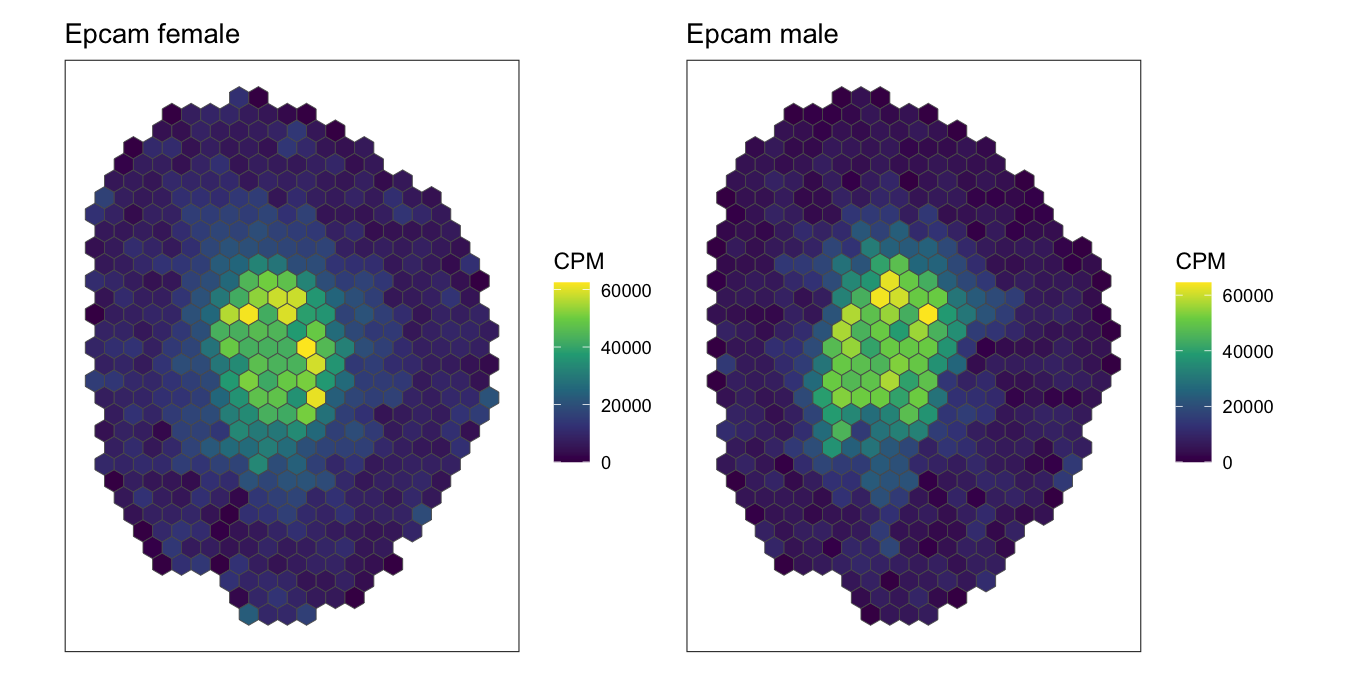
Indeed, the rasterized expression of Epcam in both kidneys look quite similar with high expression in the inner medulla and fades towards the cortex, suggesting good alignment and also reasonable rasterization resolution.
Now we can run STcompare to ask two questions about every gene:
- Spatial correlation: is the gene’s spatial pattern the same in both kidneys? This is the Pearson correlation of the gene’s CPM across the matched pixels. Neighbouring pixels are not independent, so STcompare computes the p-value by comparing the observed correlation against correlations from many “surrogate” patterns. The surrogates keep each kidney’s spatial autocorrelation but are unrelated to the other kidney.
- Spatial similarity: is the gene’s expression level the same at matched locations? This is the share of pixels where the two kidneys are within two-fold of each other.
In version 2, compareSpatial() does both in one call. The named list rast labels the samples: female is the first sample (X) and male the second (Y). We don’t pass a list of genes, so STcompare tests every gene. seed = 0 makes the permutations reproducible.
We wrap the call in system.time() to measure how long it takes.
runtime <- system.time(
  res <- compareSpatial(rast, assay = "CPM", nThreads = threads, seed = 0)
)
runtime
   user  system elapsed
124.691   0.395  16.566
All 193 genes took only 16.6 seconds of wall-clock time (elapsed) on 8 threads. The user time of about 125 seconds is the CPU time summed over all threads, so a single thread would take roughly two minutes.
Let’s take a look at the results.
head(res)
       gene nPixels correlationCoef  pValueNaive pValuePermuteX pValuePermuteY pValuePermute pValuePermuteAdj nPermutations        stop deltaStarMedianX
A2m     A2m     505      0.01738447 6.967371e-01     0.64285714    0.785714286   0.769230769      1.000000000            13 exceedances             0.05
Ackr1 Ackr1     505      0.14180230 1.398928e-03     0.01239669    0.015151515   0.013793103      0.081455221           725 exceedances             0.60
Acta2 Acta2     505      0.07236507 1.043112e-01     0.12820513    0.141025641   0.129870130      0.368601986            77 exceedances             0.01
Ager   Ager     505     -0.01049967 8.139195e-01     0.84615385    0.769230769   0.833333333      1.000000000            12 exceedances             0.25
Aire   Aire     505      0.24745834 1.750296e-08     0.00183756    0.004042631   0.003676471      0.033788515          2720 exceedances             0.60
Apoe   Apoe     505      0.39239958 4.888421e-20     0.00009999    0.000099990   0.000099990      0.002756867         10000       limit             0.20
      deltaStarMedianY deltaGridEdge percentSimilarity percentDissimilarityX percentDissimilarityY numPixelInThresh       t1       t2 status message
A2m               0.40         FALSE        0.07317073             0.7154472            0.21138211              123    0.000    0.000     ok
Ackr1             0.40         FALSE        0.01754386             0.5263158            0.45614035               57    0.000    0.000     ok
Acta2             0.05          TRUE        0.27217742             0.4375000            0.29032258              496    0.000    0.000     ok
Ager              0.55         FALSE        0.24293785             0.4604520            0.29661017              354    0.000    0.000     ok
Aire              0.01          TRUE        0.03164557             0.2974684            0.67088608              158    0.000    0.000     ok
Apoe              0.30         FALSE        0.44841270             0.5059524            0.04563492              504 4683.491 2611.371     ok
A few columns of the result are worth knowing:
correlationCoef: the spatial correlation r.pValueNaive: the p-value of an ordinary correlation test, which assumes the pixels are independent. For example, for Ackr1, its naive p-value is 0.0014, but accounting for spatial autocorrelation its permutation p-values are about 0.01.pValuePermuteAdj: the permutation p-value, adjusted for testing many genes. This is the column to use to call a gene significant.
Let’s filter the genes by their spatial correlation and adjusted p-value:
tab <- as.data.frame(res)
tab <- tab[tab$status == "ok", ]
tab$class <- factor(ifelse(tab$pValuePermuteAdj < 0.05,
                           ifelse(tab$correlationCoef > 0, "positive", "negative"),
                           "not significant"),
                    levels = c("positive", "negative", "not significant"))
table(tab$class)
       positive        negative not significant
             24               0             169
Only 24 of the 193 genes have a significantly shared spatial pattern between the female and male kidney. So among the 200 or so targeted genes in this panel, none seem to exhibit a significant spatially differential pattern. Indeed, the Slco1a6 gene we found previously in our Visium analysis is not among the genes included in this limited panel.
We can use the plotOverview() to summarize all genes at once. It returns a patchwork of ggplot2 panels, so we can add layers to individual panels. Here we use ggrepel to label all 24 significant genes in panels A and C, with labels that don’t overlap each other.
labelled <- tab[tab$class == "positive", ]
repel <- function(y, ...) {
  ggrepel::geom_text_repel(data = labelled, aes(x = correlationCoef, y = , label = gene), ...,
                           inherit.aes = FALSE, size = 3, fontface = "italic",
                           min.segment.length = 0, box.padding = 0.4, force = 3,
                           max.overlaps = Inf, seed = 0)
}
overview <- plotOverview(res)
overview[[1]] <- overview[[1]] + repel(-log10(pValuePermuteAdj))
overview[[3]] <- overview[[3]] + repel(percentSimilarity)
overview
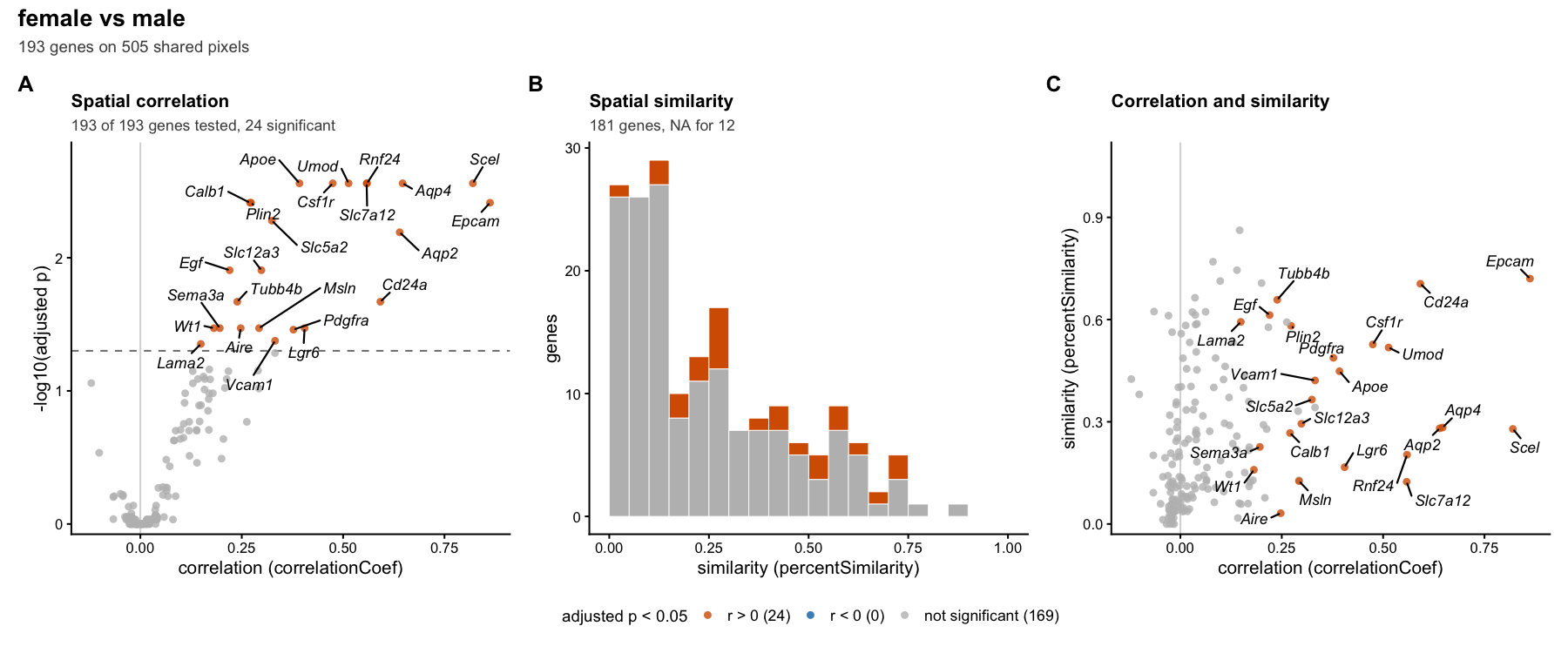
The panels:
- A: each gene’s spatial correlation against its adjusted p-value. Genes above the dashed line are significant.
- B: the distribution of spatial similarity.
- C: correlation against similarity.
Notably, looking closer at panel C, which visualizes the percentSimilarity metric (the proportion of pixels within a specific fold-change) we can see a whole range of values even among the signicantly positive spatially correlated genes. This is because the two metrics measure different things. Pearson’s correlation only asks whether a gene is high where it’s high in the other kidney and low where it’s low. Similarity characterize whether one kidney expresses the gene at twice or ten times the level of the other and where.
Let’s list the significantly correlated genes, sorted by similarity, with each gene’s mean CPM over the shared pixels in each kidney and the log2 fold change of male over female. Note this fold change is what a conventional, mean-based differential expression analysis would compare.
bulk <- data.frame(
  female = Matrix::rowMeans(assay(rast$female, "CPM")[, shared]),
  male = Matrix::rowMeans(assay(rast$male, "CPM")[, shared]))
bulk$log2FC <- log2((bulk$male + 1) / (bulk$female + 1))
cols <- c("correlationCoef", "percentSimilarity", "percentDissimilarityX", "percentDissimilarityY")
positive <- cbind(tab[tab$class == "positive", cols], bulk[tab$gene[tab$class == "positive"], ])
print(positive[order(-positive$percentSimilarity), ], digits = 2)
        correlationCoef percentSimilarity percentDissimilarityX
Epcam              0.86             0.720                  0.24
Cd24a              0.59             0.705                  0.23
Tubb4b             0.24             0.658                  0.17
Egf                0.22             0.613                  0.22
Lama2              0.15             0.593                  0.26
Plin2              0.27             0.582                  0.21
Csf1r              0.47             0.527                  0.28
Umod               0.51             0.518                  0.26
Pdgfra             0.38             0.488                  0.37
Apoe               0.39             0.448                  0.51
Vcam1              0.33             0.421                  0.38
Slc5a2             0.32             0.365                  0.21
Slc12a3            0.30             0.294                  0.16
Aqp4               0.65             0.283                  0.54
Aqp2               0.64             0.281                  0.26
Scel               0.82             0.279                  0.39
Calb1              0.27             0.267                  0.42
Sema3a             0.20             0.226                  0.37
Rnf24              0.56             0.203                  0.53
Lgr6               0.41             0.167                  0.43
Wt1                0.18             0.159                  0.52
Msln               0.29             0.126                  0.35
Slc7a12            0.56             0.124                  0.81
Aire               0.25             0.032                  0.30
        percentDissimilarityY female   male  log2FC
Epcam                   0.044  14140  12740 -0.1503
Cd24a                   0.062  16599  12872 -0.3669
Tubb4b                  0.175  16968  17856  0.0736
Egf                     0.168 152349 147399 -0.0477
Lama2                   0.144   2328   2100 -0.1486
Plin2                   0.209   4936   5369  0.1215
Csf1r                   0.190   4297   4325  0.0092
Umod                    0.218 119052 131765  0.1464
Pdgfra                  0.140   2036   1459 -0.4805
Apoe                    0.046  17076   7901 -1.1118
Vcam1                   0.196   2111   1580 -0.4183
Slc5a2                  0.425  17583  24724  0.4918
Slc12a3                 0.547  81954 109189  0.4139
Aqp4                    0.178   3136   2262 -0.4713
Aqp2                    0.460  34726  66059  0.9277
Scel                    0.330    545    558  0.0352
Calb1                   0.310  17270  12645 -0.4497
Sema3a                  0.409    248    285  0.1978
Rnf24                   0.269   4170   1680 -1.3110
Lgr6                    0.400     77     82  0.0746
Wt1                     0.322    634    349 -0.8585
Msln                    0.526    303    759  1.3208
Slc7a12                 0.066  43802   2876 -3.9286
Aire                    0.671     35    122  1.7837
We can also visualize all 24 significant genes, ordered from the highest to the lowest similarity. For each gene, we draw the CPM of the shared pixels in both kidneys with sf, using the pixel polygons that SEraster stores in the geometry column. Each gene has its own colour scale, shared by the two kidneys, so that we can compare the levels between the sexes.
significant <- rownames(positive)[order(-positive$percentSimilarity)]
mapGene <- function(g) {
  d <- do.call(rbind, lapply(names(rast), function(sex) {
    sf::st_sf(sex = sex, CPM = assay(rast[[sex]], "CPM")[g, shared],
              geometry = colData(rast[[sex]])[shared, "geometry"])
  }))
  ggplot(d) +
    geom_sf(aes(fill = CPM), colour = NA) +
    facet_wrap(~sex) +
    scale_fill_viridis_c(labels = scales::label_number(scale_cut = scales::cut_short_scale())) +
    labs(title = g, subtitle = sprintf("r = %.2f, similarity = %.2f, adj. p = %.3f",
                                       tab[g, "correlationCoef"], tab[g, "percentSimilarity"],
                                       tab[g, "pValuePermuteAdj"])) +
    theme_void(base_size = 9) +
    theme(plot.title = element_text(face = "bold.italic"),
          legend.key.width = unit(0.25, "cm"), legend.key.height = unit(0.5, "cm"))
}
patchwork::wrap_plots(lapply(significant, mapGene), ncol = 4)
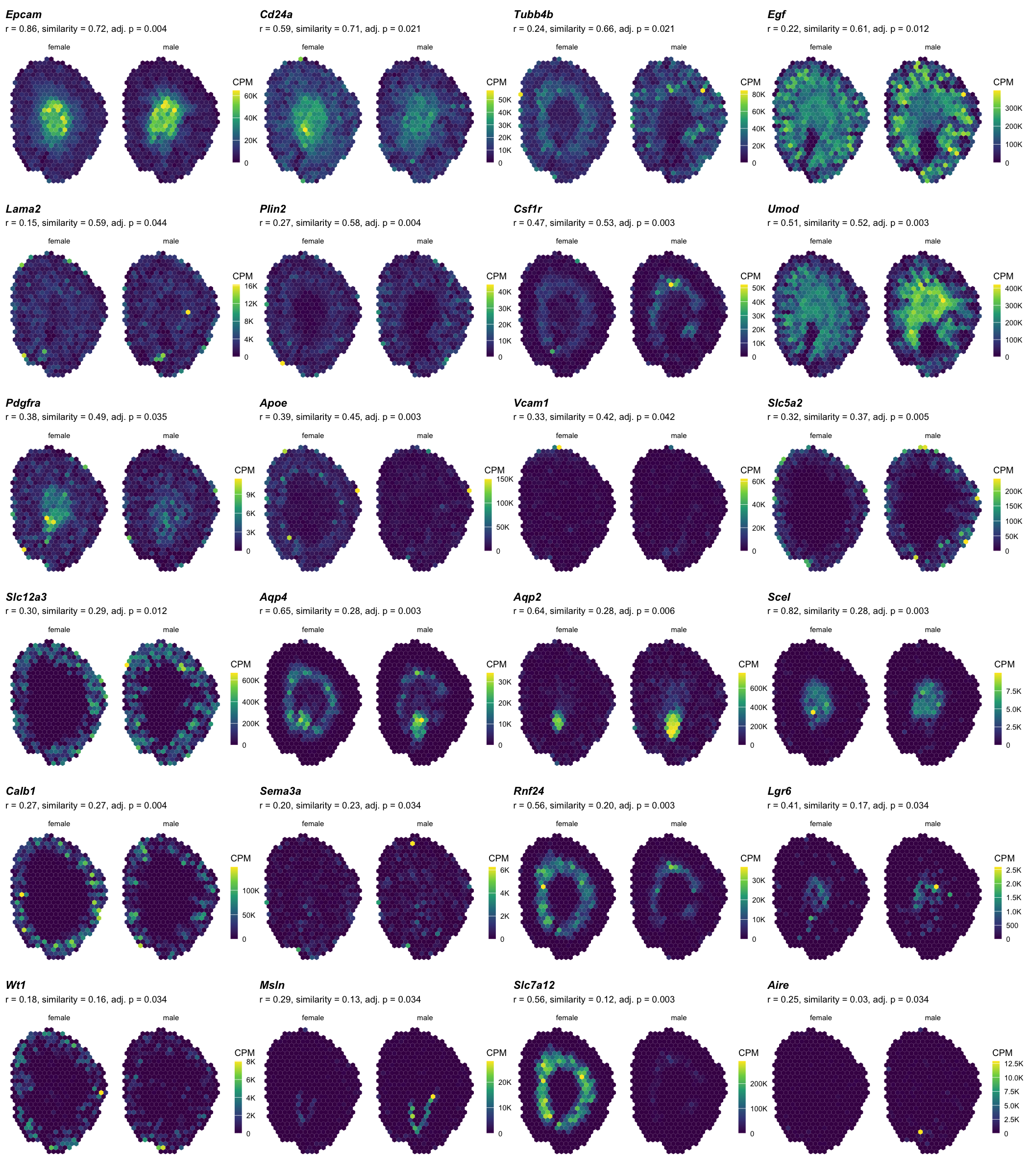
Already visually, we can appreciate there are some genes that share a spatial pattern (hence the significantly positive spatial correlation) but vary quite a bit by fold-change (hence the low spatial similarity).
We can use plotGene() to look closer at specific genes.
g <- 'Epcam'
plotGene(res, g, rast$female, rast$male,
                 native = list(femaleSpe, maleSpe),
                 nativeUnit = "cells")
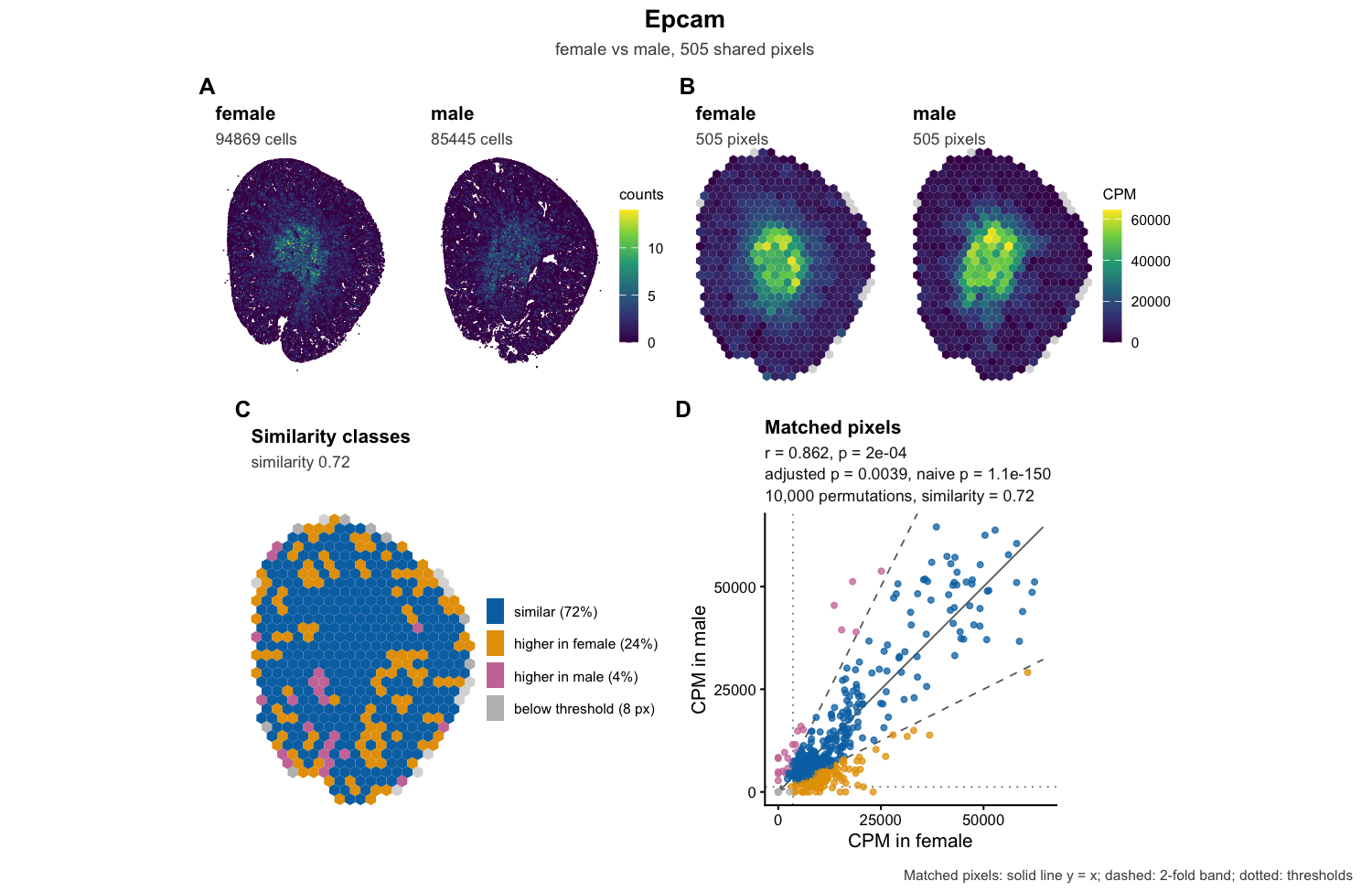
g <- 'Slc7a12'
plotGene(res, g, rast$female, rast$male,
                 native = list(femaleSpe, maleSpe),
                 nativeUnit = "cells")
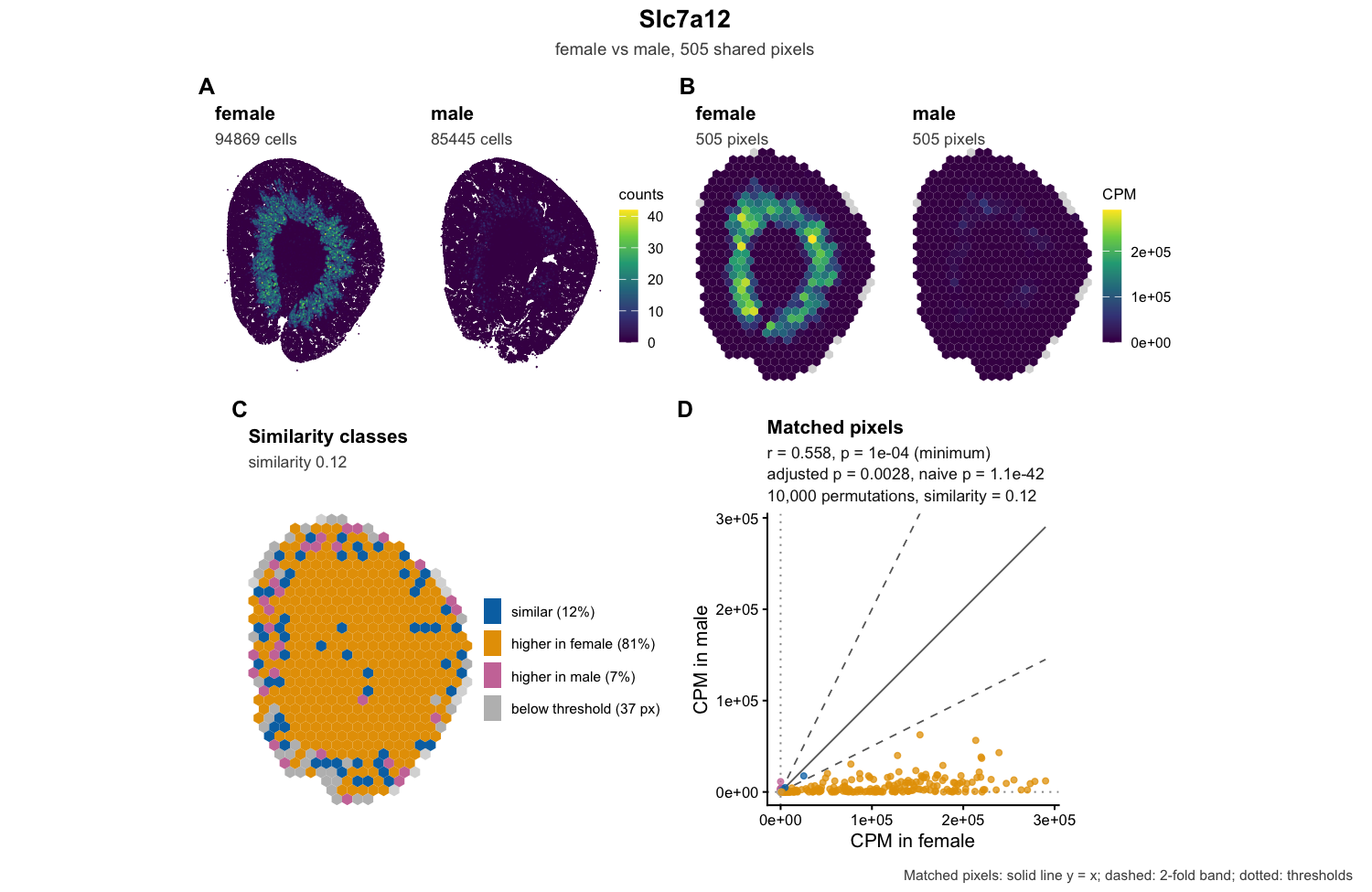
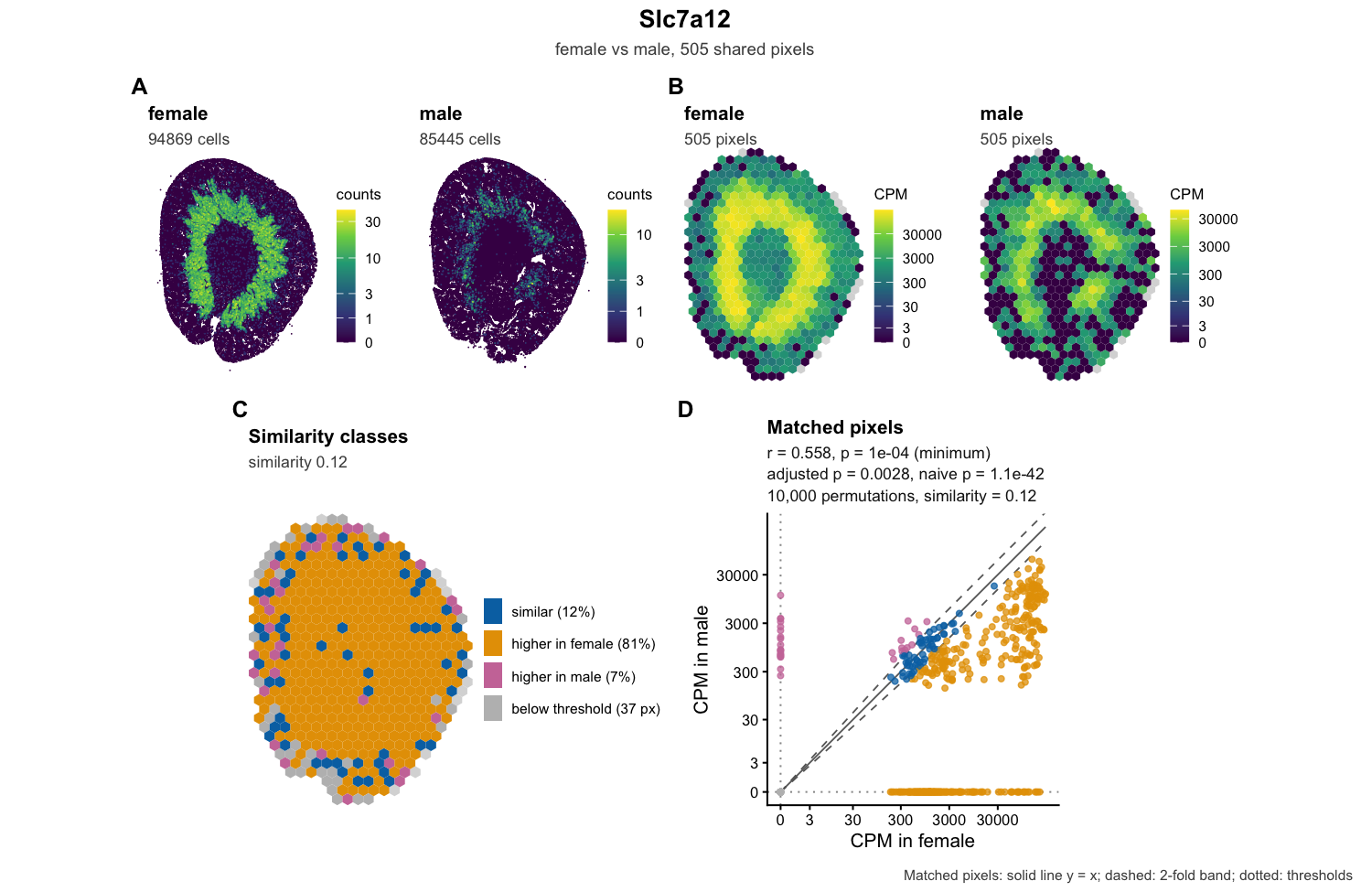
The panels:
- A: the counts in single cells.
- B: the CPM on the shared pixels, on one colour scale for both kidneys.
- C: the similarity class of each pixel. Blue pixels are within two-fold, orange pixels are more than two-fold higher in the female, pink pixels more than two-fold higher in the male, and grey pixels are below the expression threshold in both.
- D: the CPM of every matched pixel, female on the x axis and male on the y axis, with the gene’s statistics. The solid line is y = x and the dashed lines mark the two-fold band.
At first glance, Slc7a12 may look like it has a very different spatial patterns between the sexes. The female kidney has a striking ring of expression likely corresponding to the outer medulla, while the male kidney looks almost empty. 81% of pixels are more than two-fold higher in the female, and on average it’s about 15-fold higher.
And yet the spatial correlation is significantly positive (r = 0.56). Both kidneys are drawn on one colour scale, which hides the low male expression. Let’s draw each kidney on its own colour scale, on a log scale:
plotGene(res, "Slc7a12", rast$female, rast$male,
         native = list(femaleSpe, maleSpe),
         nativeUnit = "cells",
         transform = "log1p",
         sharedScale = FALSE)
Now we can see that the male kidney does express Slc7a12, at a much lower level, in the same ring pattern.
Food for thought
The code in this tutorial is derived from vibe coding using Opus 5.5 with the following 2 prompts:
STalign is a Python package for performing large deformation diffeomorphic metric mapping in order to structurally align two spatial transcriptomics datasets with each other: https://github.com/JEFworks-Lab/STalign
The data/ folder contains two spatial transcriptomics datasets: one of the male mouse kidney (GSM7090410_cartana_sham_male_segmentation) and one of a female mouse kidney (GSM7090415_cartana_sham_female_segmentation). Cell positions are given as x,y coordinates in the
segmentation_cell_stats.csvfile located within respective folders.
Use STalign to align the male mouse kidney cells as the source and the female mouse kidney cells as the target. As such, follow notebook tutorials for the single-cell resolution ST alignment where source is arrays of x and y positions of cells and target is arrays of x and y positions of cells.
Save the resulting aligned cell coordinates as a csv file in the STalign_results/ folder. Save diagnostic visualizations in the same folder.
Use uv to manage package installations.
Make the code and results available as a Jupytr notebook.
After verifying the STalign results. I used another prompt for the STcompare analysis.
Given these aligned cell coordinates, I want to identify spatially sexually dimorphic genes using STcompare: https://github.com/JEFworks-Lab/STcompare/
Run STcompare on these spatial transcriptomics mouse kidney datasets using the new STalign aligned cell coordinates. The transcriptomic gene expression data corresponding to each cell is given in the
segmentation_counts.tsvfile located within respective folders where each column is a cell and each row is a gene. Genes are denoted with gene names as the first column. Cells have cell IDs as the first row. Expression numbers represent gene counts.
Given that there are less than 200 genes profiled, create data visualizations in PNG format for shared genes across the aligned male and female kidneys comparing their spatial patterns. Save results in the STcompare_results/ folder.
Make the code and results available as a markdown file.
It took Opus 5.5 a few minutes to generate the code. As we can see from the runtime benchmarks, it took less than a minute for the code to run. It took me a few hours across several days to simply look through, interpret, and reorganize the results into a blog post.
Given the speed at which we can vibe code, perform computational analyses, and generate results now, some may be inclined to believe that AI will replace computational biologists. But, in my opinion, these results alone are not sufficiently interesting to even warrant writing into a scientific publication let alone create any actionable impact. If anything, this is just the beginning.
Slc7a12 is actually already known to be one of the most one of the most highly sexually dimorphic differentially expressed genes in the mammalian kidney, being expressed much more highly in proximal tubule segment 3 in females than males. This gene encodes for a protein in the solute carrier (SLC) family and functions as a membrane transporter for cationic amino acids.
So why don’t male kidneys express this gene? Do males not need to transport cationic amino acids? Perhaps (more likely) males have a paralogous gene that encodes for a different but functionally similar transporter that is spatially patterned in the same way. Why are there such sexually dimorphic amino acid transporters? How did they come to be (evolutionarily)? How do these transporters interact with hormones? With (pharmaceutical) drugs? Men have certain kidney diseases like acute kidney injury more frequently compared to women; could such sexually dimorphic transporter give us some insight as to why this may be? How can we use these insights to inform drug discovery? Without additional analyses to address these types of questions, we are limited to observational curiosities that do not provide any useful biological insight.
Keep in mind, with these spatial transcriptomics datasets, we only measured ~200 targeted genes. So many of these questions, such as identifying the similarly spatially patterned male paralog gene, is not possible given the current datasets. This highlights an important reminder of the limitation of AI, particularly in the context of biology: we don’t know what we don’t know and we can’t do machine learning on measurements we don’t have. Perhaps we can return to the Visium dataset or integrate other omics datasets such as bulk sequencing, protein structure mapping, and so forth to find this gene.
At the end of the day, I hope students will appreciate how: yes, it’s never been easier for AI and vibe coding to generate some results. But seldom are such results on their own sufficient to be interesting or impactful. These results can serve as a starting point to amplify your curiosity, not replace it. So get curious! See if you can take what you’ve learned and re-evaluate the Visium datasets from our last blog post to find address some of these questions for yourself!
Recent Posts
- STalign and STcompare to identify spatially sexually dimorphic genes in single-cell resolution spatial transcriptomics data of mouse kidneys on 22 October 2026
- STcompare to identify spatially sexually dimorphic genes in mouse kidneys on 22 September 2026
- AI-guided data visualization of gas prices in different geographical locations across the US over time on 04 May 2026
- The Mentorship Index on 01 March 2026
- Vibe coding with SEraster and STcompare to compare spatial transcriptomics technologies on 22 February 2026